Overview
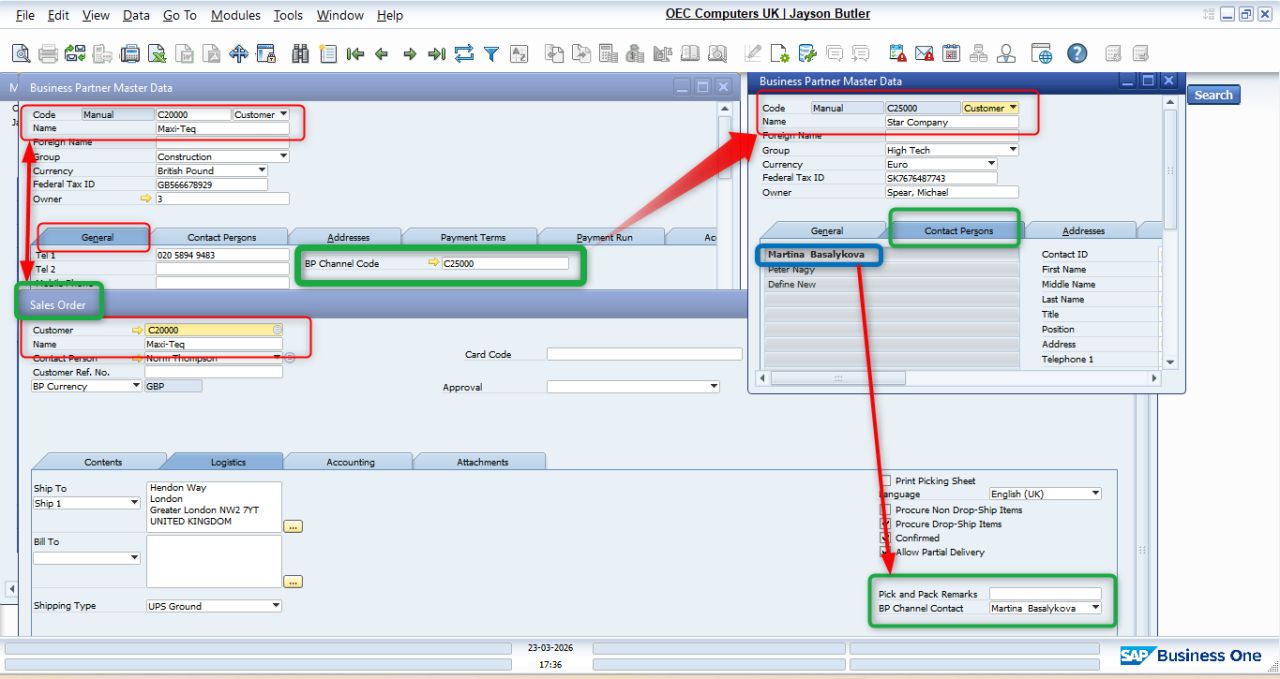
The BP Channel Code feature links an End Customer with a Channel Partner, allowing SAP Business One to automatically populate partner information on marketing documents.
This improves partner visibility, reduces manual entry, and ensures consistent sales tracking.
Configuration
Path:
Business Partners → Business Partner Master Data → General
- Open the Customer Master.
- Enter the Channel Partner Customer Code in the BP Channel Code field.
Note: Only Business Partners with the Customer type can be selected.
Result
After configuring the BP Channel Code:
- ✔ BP Channel is automatically populated on Sales Orders, Deliveries, and A/R Invoices.
- ✔ BP Channel Contact is retrieved from the Channel Partner's Contact Persons.
- ✔ Information flows automatically to related document fields.
- ✔ Eliminates repeated manual selection.
Was this article helpful?
That’s Great!
Thank you for your feedback
Sorry! We couldn't be helpful
Thank you for your feedback
Feedback sent
We appreciate your effort and will try to fix the article