Overview
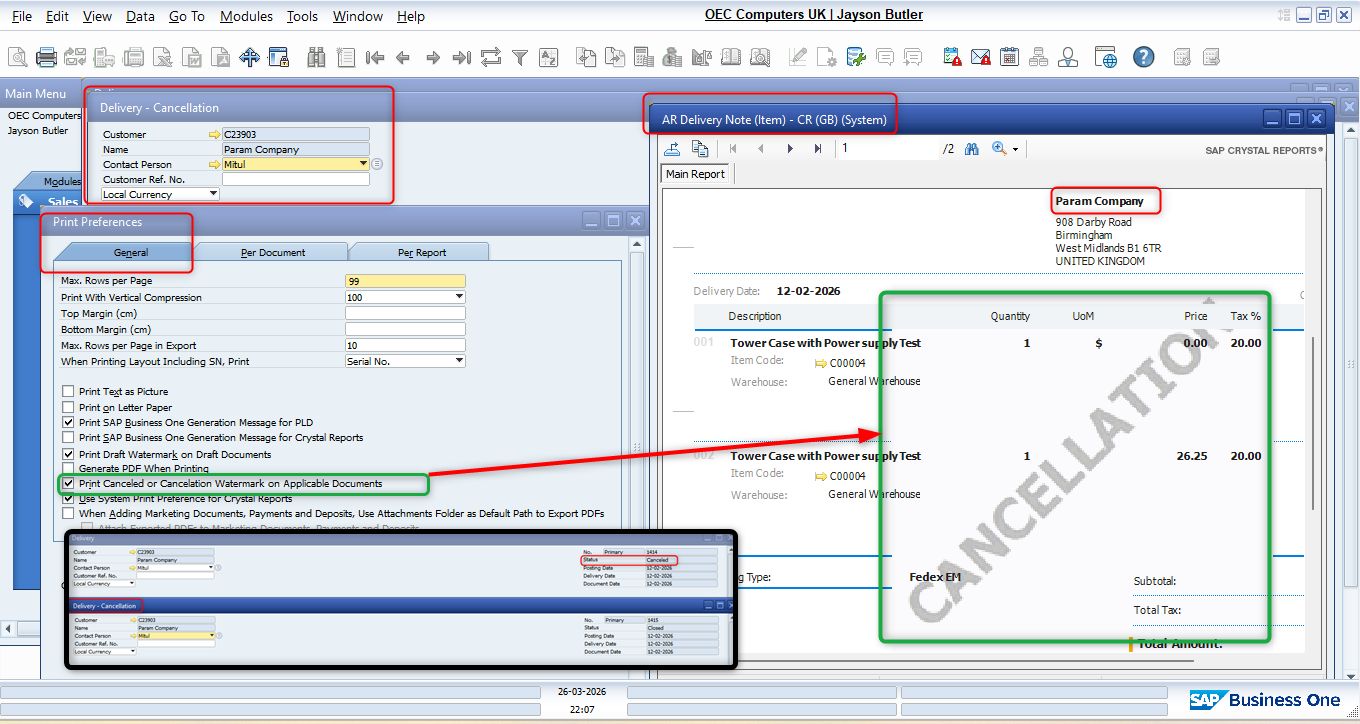
In SAP Business One, canceling a marketing document creates two separate documents:
- Original Document → Status changes to Cancelled
- Cancellation Document → System-generated reversal document
Without a watermark, printed documents can easily be mistaken for active transactions.
Configuration
Path:
Administration → System Initialization → Print Preferences → General
Enable:
✅ Print Cancelled or Cancellation Watermark on Applicable Documents
Result
After enabling this option:
- ✔ Cancelled documents display a "Cancelled" watermark.
- ✔ Cancellation documents display a "Cancellation" watermark.
- ✔ Works in Print Preview, PDF, and Crystal Report layouts.
- ✔ Automatically applies to supported marketing documents (Delivery, GRPO, A/R Invoice, A/P Invoice, etc.).
A simple checkbox that provides a significant improvement in document control, audit readiness, and operational clarity.
Was this article helpful?
That’s Great!
Thank you for your feedback
Sorry! We couldn't be helpful
Thank you for your feedback
Feedback sent
We appreciate your effort and will try to fix the article